Alchemist is capable of simulating the movement of pedestrians with sophisticated cognitive capabilities:
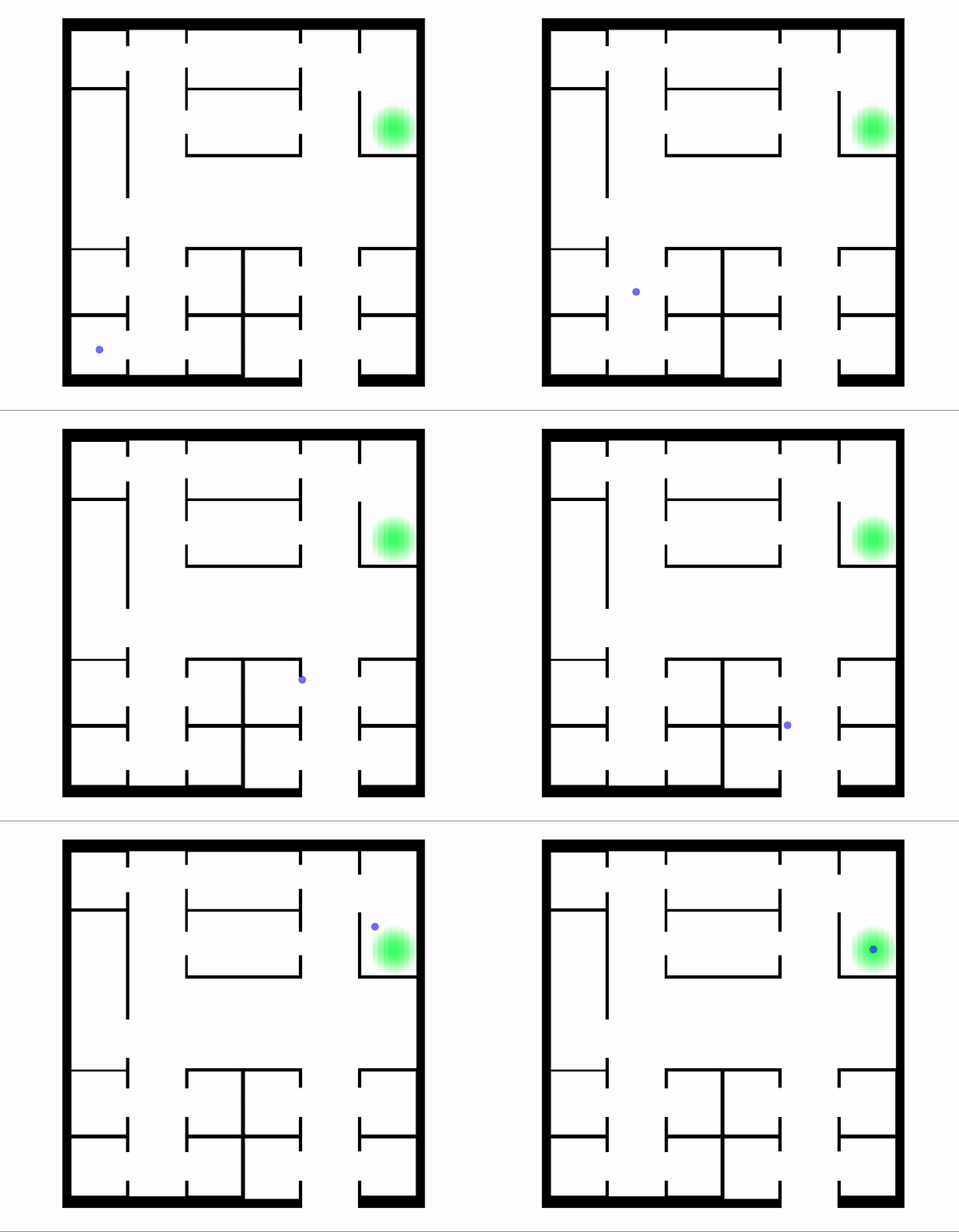
The animation above shows an adult male with no previous knowledge of the environment trying to reach the destination marked green.
Prerequisites
This guide assumes you already know the Alchemist metamodel, how to write simulations, and how to generate a navigation graph.
Types of pedestrian
There are three basic types of pedestrian, each representing a more sophisticated version of the previous one. These are derived from the work of van der Wal et al.
Homogeneous Pedestrian
Homogeneous pedestrians are Nodes with no peculiar characteristic each other.
incarnation: protelis

deployments:
  - type: Circle
    parameters: [100, 0, 0, 20]
    nodes:
      type: HomogeneousPedestrian2D
Heterogeneous Pedestrian
Heterogeneous pedestrians have an age and a gender, based on which their speed, compliance and social attitudes are computed. The age groups available are: child, adult, elderly; alternatively you can specify the exact age. The genders available are: male, female.
incarnation: protelis

deployments:
  - type: Circle
    parameters: [50, 0, 0, 20]
    nodes:
      type: HeterogeneousPedestrian2D
      parameters: ["elderly", "female"]
  - type: Circle
    parameters: [50, 0, 0, 20]
    nodes:
      type: HeterogeneousPedestrian2D
      parameters: ["child", "male"]
Cognitive Pedestrian
Cognitive pedestrians are heterogeneous pedestrians with cognitive capabilities. They have an emotional state and are able to influence and be influenced by others with the same capabilities. As an example, cognitive pedestrians can perceive fear via social contagion (e.g. seeing other people fleeing may cause them flee as well despite they haven't directly seen the danger).
incarnation: protelis

_reactions: &behavior
  - time-distribution:
      type: DiracComb
      parameters: [1.0]
    type: CognitiveBehavior

deployments:
  - type: Circle
    parameters: [50, 0, 0, 20]
    nodes:
      type: CognitivePedestrian2D
      parameters: ["adult", "male"]
    programs:
      - *behavior
  - type: Circle
    parameters: [50, 0, 0, 20]
    nodes:
      type: CognitivePedestrian2D
      parameters: ["adult", "female"]
    programs:
      - *behavior
Orienting pedestrians
As shown in the animation on the top of the page, pedestrians can be equipped with different knowledge degrees of the environment. To do so, a particular type of pedestrian called orienting pedestrian is required: this is derived from the work of Andresen et al. There are two available types of orienting pedestrian, described below.
Homogeneous orienting pedestrian
These are homogeneous pedestrians that can be equipped with a given knowledge degree of the environment. Such quantity is a Double value in [0,1] describing the percentage of environment the pedestrian is familiar with prior to the start of the simulation (thus it does not take into account the knowledge the pedestrian will gain during it). Note that despite their name ("homogeneous"), knowledge degrees of different homogeneous orienting pedestrians may differ, and even pedestrians with the same knowledge degree can be different as each one can be familiar with different portions of the environment. Be also aware that orienting pedestrians can only be placed in an EnvironmentWithGraph, which is a type of environment providing a navigation graph (see how to generate navigation graphs).
incarnation: protelis

environment:
  type: ImageEnvironmentWithGraph
  parameters:
    path: planimetry.png
    zoom: 0.05

deployments:
  - type: Point
    parameters: [2, 2]
    nodes:
      type: HomogeneousOrientingPedestrian2D
      parameters: [0.5]
Cognitive orienting pedestrian
As you may guess, these are cognitive pedestrians equipable with a given knowledge degree of the environment. Cognitive orienting pedestrians can be instanced providing their knowledge degree as first parameter.
incarnation: protelis

environment:
  type: ImageEnvironmentWithGraph
  parameters:
    path: planimetry.png
    zoom: 0.05

_reactions: &behavior
  - time-distribution:
      type: DiracComb
      parameters: [1.0]
    type: CognitiveBehavior

deployments:
  - type: Point
    parameters: [2, 2]
    nodes:
      type: CognitiveOrientingPedestrian2D
      parameters: [0.5, "adult", "male"]
    programs:
      - *behavior
Groups
It is likely that a pedestrian doesn't move on its own, but there is a group consisting of multiple people which are related each other and whose behaviors are strictly dependant on that structure. The only way you can currently assign a group to a pedestrian is by creating it as a variable and passing it as a parameter when the Nodes created are of pedestrian type. If you don't specify any group in this phase, automatically a new group of type Alone is assigned.
The following simulation example loads two groups of homogeneous pedestrians representing friends around the center of the scene, one having 10 members and the other 15.
incarnation: protelis

variables:
  group1: &group1
    formula: it.unibo.alchemist.model.implementations.groups.GroupFactory.friends()
    language: kotlin
  group2: &group2
    formula: it.unibo.alchemist.model.implementations.groups.GroupFactory.friends()
    language: kotlin

deployments:
  - type: Circle
    parameters: [10, 0, 0, 20]
    nodes:
      type: HomogeneousPedestrian2D
      parameters: [*group1]
  - type: Circle
    parameters: [15, 0, 0, 20]
    nodes:
      type: HomogeneousPedestrian2D
      parameters: [*group2]
Steering Actions
Steering actions are Actions whose purpose is moving a node inside an environment. There are quite a lot of these actions, but they can be divided into two categories:
- those inspired to Reynold's steering behaviors, which operate in a greedy fashion, i.e. performing only local choices;
- those inspired to the work of Andresen et al, also called
NavigationActions, which exploit the spatial information available to orienting pedestrians in order to navigate the environment consciously (e.g. without getting stuck in U-shaped obstacles). Note that these actions do not assume that pedestrians have global knowledge of the environment, on the contrary only the spatial information available to a pedestrian is used to move it (which can be little or nothing).
For a complete overview of the available actions refer to the api documentation. The creation of complex movements can be accomplished by combining different steering actions together. The only way currently available to do so is by using some SteeringBehavior extending Reaction, which can recognize, across all the actions specified, the steering ones to trait them in a separate way.
In this simulation 50 people wander around the environment and if they are approaching an obstacle they avoid it.
incarnation: protelis

environment:
  type: ImageEnvironment
  parameters: [planimetry.png]

_reactions: &behavior
  - time-distribution:
      type: DiracComb
      parameters: [3.0]
    type: PrioritySteering
    actions:
      - type: HeadTowardRandomDirection
      - type: CognitiveAgentWander
        parameters: [6, 4]
      - type: CognitiveAgentObstacleAvoidance
        parameters: [4]

deployments:
  - type: Circle
    parameters: [50, 0, 0, 25]
    nodes:
      type: HomogeneousPedestrian2D
    programs:
      - *behavior
Steering Strategies
In order to decide the logic according to which the different steering actions must be combined, the concept of steering strategy has been introduced and related to it different reactions are available to be used with the aim of computing the desired route for the pedestrians. If you want a pedestrian to execute a single steering action at a time, PrioritySteering is a reaction which gives relevance only to the steering action whose target point is the nearest to the current pedestrian position. If you want a pedestrian to execute a movement considering multiple actions at a time, BlendedSteering weights them considering their target distance to the current pedestrian position. There is no limit to the number of steering actions which can be used together but some messy compositions can result in unpredictable behaviors, so pay attention.
In the example below a pedestrian reaches a point of interest, avoiding in the meantime to approach another position.
incarnation: protelis

environment:
  type: Continuous2DEnvironment

_reactions: &behavior
  - time-distribution:
      type: DiracComb
      parameters: [1.0]
    type: BlendedSteering
    actions:
      - type: CognitiveAgentSeek
        parameters: [1000, 500]
      - type: CognitiveAgentFlee
        parameters: [500, -500]

deployments:
  - type: Point
    parameters: [0, 0]
    nodes:
      type: HomogeneousPedestrian2D
    programs:
      - *behavior
Evacuation Scenarios
Pedestrians can be loaded in any kind of Environment but it is recommended to use PhysicsEnvironments since they have properties such as non-overlapping shapes which are advisable to be taken into consideration when working with a crowd. To specify the existence of a potential danger or a significative zone in general inside the environment you can use Layers. Each layer is associated to a Molecule different from the one of all the others. You must specify to any cognitive pedestrian the Molecule representing danger in the Environment, otherwise it won't have the ability to recognize the presence of it.
In the following example 100 adult females with cognitive capabilities get away from a zone in the environment where there is a potential danger.
incarnation: protelis

variables:
  danger: &danger
    formula: "\"danger\""

environment:
  type: Continuous2DEnvironment

layers:
  - type: BidimensionalGaussianLayer
    molecule: *danger
    parameters: [0.0, 0.0, 20.0, 15.0]

_reactions: &behavior
  - time-distribution:
      type: DiracComb
      parameters: [1.0]
    type: CognitiveBehavior
    actions:
      - type: CognitiveAgentAvoidLayer
        parameters: [*danger]

deployments:
  - type: Circle
    parameters: [100, 0, 0, 50]
    nodes:
      type: CognitivePedestrian2D
      parameters: ["adult", "female", *danger]
    programs:
      - *behavior
Navigation system
Each time a pedestrian enters a new room (= environment's area), all the visible doors are weighted, the one with minimum weight is then crossed. The weighting system used in Alchemist is derived from the one by Andresen et al, here's a brief description of the factors included, these are multiplied to get the final weight.
| Name | Description |
|---|---|
| volatileMemoryFactor | Takes into account the information stored in the pedestrian's volatile memory (= a map pairing each room with the number of visits, models the ability to remember areas of the environment already visited since the start of the simulation). It is computed as 2^v where v is the number of visits to the area the edge being weighted leads to (in other words, less visited rooms are preferred). |
| congestionFactor | Takes into account the congestion of the area the edge being weighted leads to (it is assumed that the pedestrian can estimate the congestion level of a neighboring room). It is computed as density of the area + 1, so as to have a value in [1,2] (less crowded rooms are preferred). |
| impasseFactor | Takes into account whereas a door leads to a known impasse or not, known impasses are given knownImpasseWeight (see hardcoded parameters below), otherwise this factor assumes unitary value. |
| suitabilityFactor | This factor is used when the pedestrian is moving towards a target: each door is given an integer rank indicating its suitability in order to reach the target (ranks are computed taking into account the target and the door locations, as well as the geometry of the current room). The factor for each door is computed as 1-0.5^rank. |
Hardcoded parameters
Here's a list of all the hardcoded parameters.
| Name | Value | Description |
|---|---|---|
| knownImpasseWeight | 10 | Weight assigned to known impasses (= areas with a single door). It's usually a high value, allowing to avoid them. |
| toleranceAngle | 45 degrees | Used by SinglePrevalent steering strategy (see its api documentation), such strategy linearly combines multiple steering actions (= multiple forces) assuming one of them is prevalent. Weights for the linear combination are determined so that the resulting force forms with the prevalent one an angle smaller than or equal to the tolerance angle. The prevalent force usually wants to move the pedestrian consciously, whereas other forces are more "greedy". The purpose of the tolerance angle is allowing to steer the pedestrian towards the target defined by the prevalent force, while using a trajectory which takes into account other urges as well. |
| alpha | 0.5 | Used by SinglePrevalent steering strategy (see its api documentation), an exponential smoothing with this alpha is applied to the resulting force in order to reduce oscillatory movements. |
| maxWalkRatio | 0.3 | Used by SinglePrevalent steering strategy (see its api documentation). When the pedestrian is subject to contrasting forces the resulting one may be small in magnitude, hence a lower bound for such quantity is set to (maximum distance walkable by the pedestrian) * (this parameter) so as to avoid extremely slow movements. |
| delta | 0.05 | Used by SinglePrevalent steering strategy (see its api documentation). The weight assigned to disturbing forces is set to 1 and then iteratively decreased by delta until the resulting force satisfies the required conditions (see the api). This is similar to a gradient descent. |
Physical pedestrians
So far we didn't mention physical interactions between pedestrians. Guess what? Physical pedestrians are capable of pushing and bumping into each other. Similarly to Orienting Pedestrians, we have HomogeneousPhysicalPedestrian2D and CognitivePhysicalPedestrian2D. Whatsmore, you can have a physical pedestrian capable of orienting as well: there are HomogeneousOrientingPhysicalPedestrian2D and CognitiveOrientingPhysicalPedestrian2D. Physical pedestrians don't require any additional parameter upon creation, hence the constructors showed above can be used to instance them.
Physical pedestrians are inspired to the work of Pelechano et al. Note that this features are at an early stage, things might not work as expected.
Physical steering strategies
In order to work properly, physical pedestrians should be equipped with physical steering strategies. Such strategies define how steering actions (which are intentional) are combined with physical forces (which are mostly unintentional). At present, only BlendedSteeringWithPhysics and NavigationPrioritisedSteeringWithPhysics are available. For further information, see the api. Here's a simple code for loading a HomogeneousPhysicalPedestrian with Seek and Flee steering actions:
incarnation: protelis

environment:
  type: ImageEnvironmentWithGraph
  parameters:
    path: planimetry.png
    zoom: 0.05

_reactions: &behavior
  - time-distribution:
      type: DiracComb
      parameters: [1.0]
    type: BlendedSteeringWithPhysics
    actions:
      - type: CognitiveAgentSeek
        parameters: [1000, 500]
      - type: CognitiveAgentFlee
        parameters: [500, -500]

deployments:
  - type: Point
    parameters: [2, 2]
    nodes:
      type: HomogeneousPhysicalPedestrian2D
    programs:
      - *behavior
Further references
Craig W. Reynolds
Steering Behaviors for Autonomous Characters. 1999.