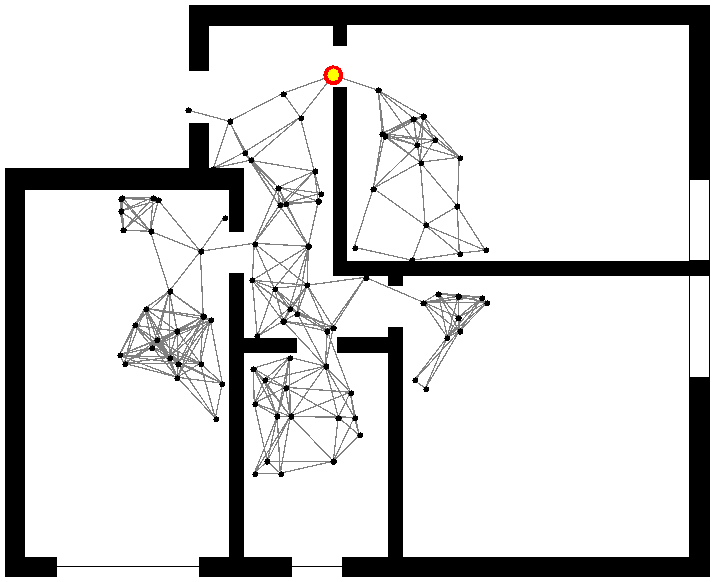
In order to load map of indoor environment, you can use ImageEnvironment.
ImageEnvironment loads the map as raster image from file, interpreting the black pixels as obstacles (wall-like areas not accessible to nodes). Color of pixels that represents obstacles can be set to every color with relative constructor's parameter, black is default.
By default, each pixel is considered as a 1x1 block. As a consequence, a 1200x600 image with a vertical line of black pixels at coordinate 500 will be interpreted as a single obstacle of size 1x600 starting at coordinate (500, 0). It is possible to scale up or down the size of the environment by acting on the zoom parameter of ImageEnvironment, as well as changing the initial coordinates.
In this example the image with the map is in the classpath in the folder images. Using a network-model
like ObstaclesBreakConnection the connections between nodes are created only if there
aren't obstacles between them. The nodes moves with a brownian move and never they moves across the walls.
incarnation: protelis
environment:
  type: ImageEnvironment
  parameters: [images/foo.png]

  network-model: { type: ObstaclesBreakConnection, parameters: [100] }

  program-pools:
    - move: &move
      - time-distribution: { type: ExponentialTime, parameters: [1] }
        type: Event
        actions:
          - { type: BrownianMove, parameters: [1] }
  deployments:
    - in: { type: Circle, parameters: [100, 700, 700, 300] }
      programs:
        - *move
The following image is a snapshot of the previous simulation. It is possible see how there aren't link between nodes across walls.